Going Keyless in the NCR? Read This Before You Throw Away Your Last Physical Key
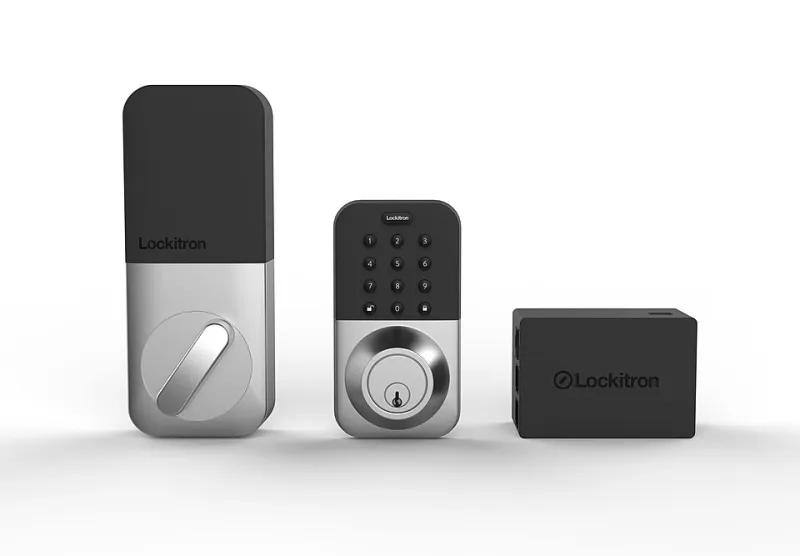
Photo: Lockitron/Apigy, Inc., CC BY-SA 4.0, via Wikimedia Commons
The Appeal Is Real. So Are the Complications.
The pitch for keyless entry is difficult to argue with on its surface. No more fumbling for keys in the dark. No more emergency locksmith calls because a copy was misplaced. Remote access for guests, housekeepers, and contractors. An audit trail of every entry and exit. For homeowners across the DC Metro area who juggle busy schedules and complex household logistics, the appeal is immediate and obvious.
Sales of smart locks have climbed steadily across the NCR, particularly in newer construction in areas like Tysons, Navy Yard, and the Silver Spring corridor. But alongside the genuine enthusiasm, a quieter conversation has been developing among locksmiths, home security professionals, and homeowners who have completed the transition—or attempted it and reversed course.
The keyless life, it turns out, comes with a set of practical trade-offs that product marketing rarely addresses head-on.
What "Going Keyless" Actually Costs
The sticker price of a smart lock—typically ranging from $100 to $400 for consumer-grade models, with professional-grade hardware running higher—represents only part of the real cost of a keyless transition.
Installation is the first variable. Many smart locks are marketed as straightforward DIY replacements for standard deadbolts, and for newer doors with modern framing, that description is often accurate. However, older homes—and the NCR has no shortage of them—frequently present complications. Door thickness, backset measurements, and strike plate positioning may not align with the specifications of a given smart lock model. In those cases, professional installation becomes necessary, adding $75 to $150 or more to the upfront investment.
For homeowners in DC's historic districts, the calculus becomes more involved. Properties subject to historic preservation guidelines in neighborhoods such as Georgetown, Capitol Hill, and Old Town Alexandria may face restrictions on visible exterior modifications. Some smart lock models are incompatible with the older mortise-style hardware common in pre-war rowhouses and Victorian-era homes, requiring either a lock system designed specifically for older door profiles or a more extensive—and potentially regulated—hardware upgrade.
Ongoing costs add up as well. Smart locks consume power continuously, and battery life varies considerably by model and usage frequency. High-traffic households may find themselves replacing batteries every few months. Wi-Fi-enabled locks that connect to a home network draw more power than Bluetooth-only models and may require a separate hub or bridge device. Some manufacturers also charge subscription fees for advanced features such as remote access logs, guest code management, or integration with broader smart home platforms.
The Connectivity Question
A smart lock that loses its internet connection is, functionally, a very expensive standard lock—assuming the manual override still works. This distinction matters more than many buyers realize at the point of purchase.
Wi-Fi outages, router failures, and app server downtime are not hypothetical scenarios. They happen, and when they do, a homeowner standing at their front door with a dead phone battery and a non-responsive lock faces a problem that a traditional key would have solved in two seconds.
The NCR's weather patterns add another dimension to this concern. Winter temperatures in the DC Metro area regularly drop below freezing, and extreme cold can affect both battery performance and the mechanical components of electronic locks. A lock that functioned perfectly in October may respond sluggishly—or not at all—on a January morning when the temperature has dropped into the teens overnight.
Locksmiths who service smart lock hardware across the region recommend that homeowners retain at least one physical key override option, even on systems that are otherwise fully keyless. Most smart locks include a physical key cylinder as a backup, and using it occasionally—rather than leaving it dormant for months—helps ensure it remains functional when needed.
Compatibility Across NCR Home Types
The NCR's residential landscape is unusually diverse in terms of architectural age and style, and that diversity has direct implications for smart lock compatibility.
Newer construction and post-war single-family homes in suburbs such as Reston, Gaithersburg, and Bowie typically present the fewest compatibility challenges. Standard deadbolt configurations are common, doors are usually within the thickness range that most smart locks accommodate, and there are no preservation restrictions to navigate.
Mid-century condominiums and apartment buildings introduce a different set of variables. Building management policies may restrict lock modifications on unit entry doors, and multi-unit buildings often use master key systems that are incompatible with standard smart lock retrofits. Prospective buyers in these settings should confirm with building management before purchasing hardware.
Historic rowhouses and pre-war properties in DC, Alexandria, and Annapolis require the most careful evaluation. Mortise lock configurations, non-standard door dimensions, and preservation requirements can all limit options. Several manufacturers now offer smart lock models designed for these configurations, but selection is narrower and prices are generally higher. Consulting with a locksmith familiar with historic hardware before purchasing is strongly advisable.
The Security Dimension
Smart locks introduce security considerations that differ fundamentally from those associated with traditional hardware. Physical locks are vulnerable to picking, bumping, and forced entry. Smart locks are largely resistant to those attacks—but they introduce exposure to digital threats, including brute-force PIN attempts, relay attacks on Bluetooth signals, and vulnerabilities in manufacturer apps or cloud infrastructure.
The practical risk level for most residential users is low, but it is not zero. Purchasing from established manufacturers with documented security update policies, enabling two-factor authentication where available, and changing access codes after any contractor or guest use are basic hygiene steps that significantly reduce exposure.
One underappreciated consideration: access code management requires ongoing attention in a way that physical keys do not. A key that is not returned is a discrete, identifiable problem. A four-digit code shared with a former housecleaner, a past tenant, or a contractor from two years ago is invisible until it becomes relevant—and by then, the moment to address it has passed.
How to Decide Whether Keyless Is Right for Your Property
The honest answer is that keyless entry is an excellent fit for some NCR homeowners and a poor fit for others, and the determining factors are largely practical rather than philosophical.
Keyless entry tends to deliver strong value for homeowners who manage frequent guest or contractor access, operate short-term rentals, or simply lose physical keys with regularity. The convenience and auditability of digital access codes are genuine benefits in those contexts.
It tends to deliver less value—and more frustration—for homeowners in older properties with non-standard hardware, those in buildings with restrictive management policies, or those who are not prepared to engage with the ongoing maintenance requirements of connected devices.
Before committing to a full keyless transition, KeyMaker Inn CR recommends consulting with a licensed locksmith who is familiar with both smart lock hardware and the specific characteristics of your property. A brief professional assessment can identify compatibility issues, flag any preservation concerns, and help you select a system that fits your home rather than one that requires your home to fit it.
Going keyless can be a genuinely smart upgrade. But like any security decision, it deserves more than a product review and a shopping cart.